Working with statistical functions - The stats command

In a Splunk event, we have fields that hold the values extracted from each part of the event. Among the main things we can do with these fields is counting and displaying their values, which is where the statistical analysis of our data begins.
The stats command is one of Splunk's main and most versatile commands. It starts this analysis by producing counts, sums, mode, mean, median and other functions that we will look at in detail.
Starting with the stats command, let's run a query that brings all our data from the web index and counts the events.
index=web | stats count

The values above count the total number of events, and they can be grouped by any field with the by clause. Here is an example counting the events for each IP address.
index=web | stats count by clientip

You can also use the same command to count how many events have a value in this field, with the following syntax:
index=web | stats count(action)

Notice that the values differ from the count made with stats count, because not all events have the field action.
Finally, we can group the results of this last count by a specific field.
index=web | stats count(action) by clientip

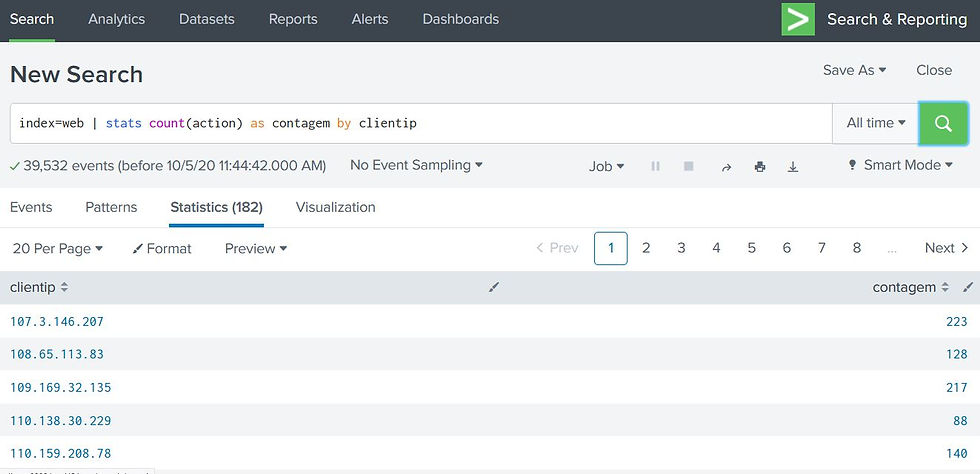
We also saw in the previous figures that the stats command creates a field named after the function it ran, to hold that function's values (see the fields count and count(action)). You can rename this field with the as clause and the new name, as in the following example:
index=web | stats count(action) as contagem by clientip
As mentioned earlier, the stats command has many functions, such as mean, median and mode, which we cover in another post on this blog.
Want to practice? Try the free We Challenge sample, with Splunk questions and explanations.
To start from scratch, see the Introduction to Splunk course on Udemy (in Portuguese). For your team, see WeValuate's Splunk training.
Questions about the post? Content suggestions? Corrections? Criticism or praise?
Please contact us at wevaluatebr@gmail.com and we will reply as soon as possible.
If you liked it, share this post on your social networks and help us spread the word!


Comments